
XenServer 9 now available
Deploy XenServer 9 and start running workloads with a modern virtualization platform designed for operational simplicity, control, and scalability.
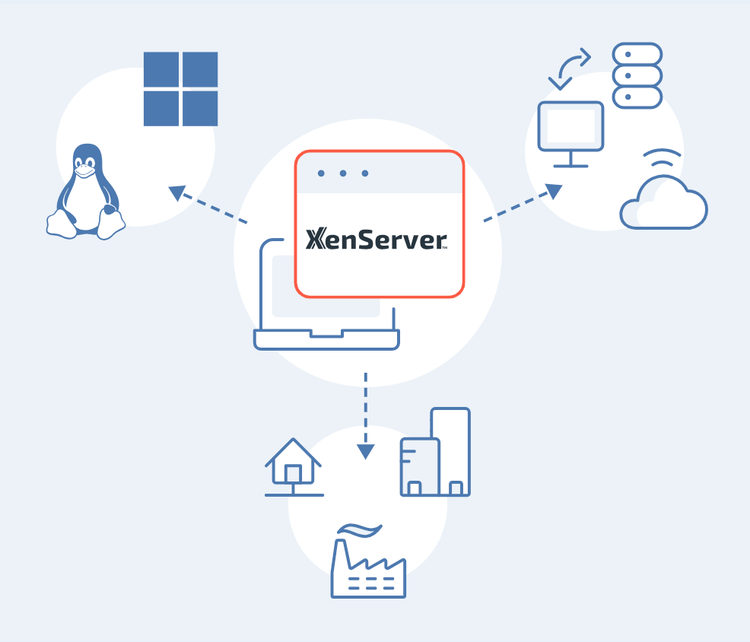
XenServer easily manages diverse workload types, a blend of operating systems, and complex storage or networking demands—even for the most challenging business use cases.
XenServer is the hypervisor optimized for the Citrix platform. With seamless feature integration at every level, XenServer leverages hardware-level functionalities to deliver a high-definition user experience, enhanced security, and streamlined operational management.
XenServer 9 is available as Premium Edition and the Trial Edition.
Download XenServer 9, and you’ll automatically be running the Trial Edition, which provides almost all functionality available within the Premium Edition.
-
Feature
- Production use
- Time limitation
- Citrix workloads
- Non-Citrix workloads
- Support for SNMP
- NRPE support for Nagios monitoring
- 64-bit hypervisor
- 64-bit control domain
- Hardware compatibility list (HCL) support
- Multi-server management with XenCenter GUI
- Active directory integration
- Role Based Access Control (RBAC)
- XenServer vApps
- Dynamic memory control (DMC)
- Performance reporting and alerting
- Live VM migration
- Heterogenous resource pools
- Live patching
- Apply updates via XenCenter
- Evergreen XenCenter
- Scheduled snapshots
- VM tools for Windows Driver update
- XenServer Conversion Manager
- Dynamic workload balancing & audit reporting (WLB)
- Export pool resource list
- Rolling pool upgrade (RPU)
- Maximum pool size
- Microsoft Windows Server 2025 guest support
- Microsoft Windows 11 support
- UEFI Secure boot for Windows VMs
- Basic network security groups
- Open Virtual Switch (OVS)
- SR-IOV capable network cards
- Efficient multicast support
- Host failure protection high availability (HA)
- Disaster Recovery
- Shared storage connectivity
- SMB storage connectivity
- Software-boot-from-iSCSI
- Shared nothing live VM migration
- Storage live migration
- Intellicache
- MCS read cache
- PVS-Accelerator
- GFS2 storage repository
- Changed block tracking
- Greater than 2TB VDI
- GPU Pass-through
- GPU virtualization
- vGPU live migration
- Disk and memory snapshots for vGPU enabled VMs
- Multiple NVIDIA vGPU support
- NUMA Optimsitation
- Host Secure Boot
- Driver Multi Version Management
-
Premium Edition
- ✓
- ✓
- ✓
- ✓
- ✓
- ✓
- ✓
- ✓
- ✓
- ✓
- ✓
- ✓
- ✓
- ✓
- ✓
- ✓
- ✓
- ✓
- ✓
- ✓
- ✓
- ✓
- ✓
- ✓
- ✓
- ✓
- ✓
- ✓
- ✓
- ✓
- ✓
- ✓
- ✓
- ✓
- ✓
- ✓
- ✓
- ✓
- ✓
- ✓
- ✓
- ✓
- ✓
- ✓
- ✓
- ✓
- ✓
- ✓
- ✓
- ✓
- ✓
- ✓
- ✓
- ✓
-
Trial Edition
- ✓
- ✓
- ✓
- ✓
- ✓
- ✓
- ✓
- ✓
- ✓
- ✓
- ✓
- ✓
- ✓
- ✓
- ✓
- ✓
- ✓
- ✓
- ✓
- ✓
- ✓
- ✓
- ✓
- ✓
- ✓
- ✓
- ✓
- ✓
- ✓
- ✓
- ✓
- ✓
- ✓
- ✓
- ✓
- ✓
- ✓
- ✓
- ✓
- ✓
- ✓
- ✓
- ✓
- ✓
- ✓
- ✓
- ✓
- ✓
- ✓
- ✓
- ✓
- ✓
- ✓
-
Note
- Supported for production use.
- Allows up to 90 days of testing.
- Supported by Premium Edition only.
- XenServer alerts are available as SNMP traps.
- Support for NRPE enabling the use of Nagios for monitoring.
- The Xen Project hypervisor upon which all workloads run.
- The 64-bit control domain manages the pooling of resources and workloads running on the host.
- Citrix actively works with hardware OEMs to ensure all commonly used hardware types are tested and supported with XenServer. The HCL of supported hardware can be found at: hcl.xenserver.com.
- The XenCenter GUI is a Windows based interface that allows for the management of servers and resource pools (collections of servers) in a simple to use scalable manner
- For support of multiple user accounts on a server or pool, utilize Microsoft Active Directory services to authenticate. This lets XenServer users log into a pool of XenServer hosts using their Windows domain credentials.
- RBAC allows you to assign users, roles and permissions to control who has access to XenServer hosts. XenServer RBAC maps individual or groups of users to defined roles, which in turn have associated XenServer permissions.
- vApps provide the ability to group multiple VMs together, to startup, shut down, set HA and recovery order policies, all at the vApp level.
- DMC automatically adjusts the amount of memory available for use by a guest VM’s operating system. By specifying minimum and maximum memory values, a greater density of VMs per host server is permitted.
- XenCenter provides the ability to monitor VM workload and host infrastructure performance, for compute, memory, network and disk metrics. Administrative alerts can also be defined.
- The live migration of VM compute workloads between two different hosts within a resource pool, allows administrators to manually manage the spread of load across their infrastructure and eliminate any outages from planned infrastructure downtime.
- When expanding existing resource pools, it is not always possible to obtain exactly the same hardware or CPUs. This feature enables new hosts and CPU versions to be added to existing pools, with support for all the VM-level features such as live migration you expect.
- Live patching enables infrastructure admins to patch the XenServer hypervisor without needing to migrate VMs from the host, shut down or suspend VMs.
- XenServer will be updated to include all the latest available hotfixes. Updates are delivered via a new CDN based mechanism directly to the Pool. Customers can choose to use XenCenter (recommended), or the command line.
- XenCenter will inform you when a new version of XenCenter becomes available and can download and install the update for you.
- Scheduled snapshots enables admins to schedule hourly, daily, or weekly snapshots on a VM or group of VMs. It also includes the ability to configure the maximum number of scheduled snapshots, in which the oldest snapshot will be deleted in a rolling fashion, to aid in the lifecycle of snapshot management.
- Automated delivery and patching of Citrix VM Tools for Windows drivers via Windows Update (WSUS), dramatically simplifying management of large scale VM deployments.
- With a separately downloadable virtual appliance, IT admins are able to batch migrate VMs from VMware vSphere infrastructures to XenServer. Windows and Linux operating systems can be migrated with minimal steps and effort.
- WLB gives system administrators deep insight into system performance, allowing infrastructure optimization, host power management and audit reporting.
- This allows for the export to a spreadsheet, of all objects within the infrastructure view of XenCenter.
- A XenCenter feature that eliminates downtime when upgrading XenServer hosts. RPU autonomously patches all hosts within a pool, evacuating and repatriating VMs with Live Migration as needed.
- XenServer supports a maximum pool size of 64 hosts. XenServer Trial Edition is limited to 3 hosts per Pool. If you are using a clustered pool with GFS2 storage, the pool size is limited to 16
- Support for running VMs with Microsoft’s newest server operating system.
- Support for running VMs with Microsoft’s newest desktop operating system.
- Support for UEFI boot on newly created 64-bit Windows 10, Windows 11, Windows Server 2019 and 2022 VMs. UEFI boot provides a richer interface for the guest operating systems to interact with the hardware, which can significantly reduce Windows VM boot times.
- Available with an OVS network, security groups is a method of tenant isolation typically used by cloud management products, such as Accelerite CloudPlatform.
- When used with a controller appliance, OVS networks are a programmable networking standard based on OpenFlow and sFlow for the collection of statistics.
- Support for SR-IOV capable network cards delivers high performance networking for virtual machines. XenServer enables the use of Single Root I/O Virtualization (SR-IOV) to allow a single PCI device to appear as multiple PCI devices on the physical system.
- The use of IGMP snooping to direct IPv4 multicast traffic only to those VMs that have registered to listen to that specific multicast.
- HA allows for the localized recovery of VMs and/or vApps due to infrastructure hardware failure. HA also ensures that a host re-election takes place, should a pool coordinator fail.
- Designed to enable customers to recover VMs and/or vApps from catastrophic hardware failure of the compute, storage and/or network layers. This is typically the loss of significant portions, if not all, of the infrastructure at a given location.
- Connectivity to all types of local and shared storage, including EXT3/EXT4, NFS v3 & v4, iSCSI, and FC HBA & open-FCoE.
- Create XenServer Storage Repositories (SRs) based on SMB storage, whether a hardware based array, or a Windows based storage server
- Boot XenServer hosts from software implemented iSCSI within Cisco UCS fabrics.
- Live migration of both a VM’s compute and storage, between different hosts and storage types. This can be within or across different resource pools and allows administrators complete flexibility to manually retire storage and eliminate planned infrastructure outages.
- The live migration of a VM’s storage, enabling administrators to select a new target SR for each of VM’s VDIs and moving these live without downtime and without moving the compute aspect of the VM.
- Leveraging local host storage, XenServer caches reads and nonpersistent writes when using a shared desktop image. This mitigates many of the off-host IOPS reducing the need for high-end arrays to support large scale infrastructures.
- When using Machine Creation Services (MCS) images for virtualized desktop and application workloads, the reads can be cached in host RAM, providing fast, scalable access and dramatically reducing off host IOPS, thereby reducing the need for high-end arrays to support large scale infrastructures.
- The integration of Citrix Provisioning Services (PVS) host cache dramatically reduces solution network traffic, enabling fewer PVS servers to handle the same volume of VMs, yet with faster VM time to boot.
- GFS2 is a Linux-based shared disk file system for block storage. Enabling the option for GFS2 as a Storage Repository delivers reduced storage costs with thin provisioning for block storage capabilities.
- Changed Block Tracking API's for XenServer enables backup vendors to develop more efficient backup solutions, so that only changed blocks are backed up after the initial VM backup.
- Ability to create virtual disk images larger than 2 TB on GFS2 SRs.
- Enables high-end 3D graphics within VMs and VDI deployments for variety of use cases, including CAD/CAM, HPC and Citrix Virtual Apps published applications. Hardware GPU providers include Intel, AMD & NVIDIA, with each GPU having a one-to-one relationship with a particular VM.
- Enables virtualized 3D GPU support for multiple VMs per host GPU. Offering superior performance when compared to software emulation, many users can leverage enhanced graphics for all supporting applications types.
- Enables live migration of GPU-enabled running VMs. vGPU Live Migration improves user experience by enabling administrators to rebalance GPU-enabled VMs across pool hosts to improve VM performance. vGPU Live Migration also enhances user productivity, enabling users to remain productive during unexpected maintenance.
- When a disk and memory snapshot of a vGPU enabled VM is taken the state of the VM includes the vGPU state.
- For NVIDIA GPUs and drivers that support multiple vGPU, you can configure a single VM to use multiple virtual GPUs concurrently. These additional vGPUs can be used to perform computational processing.
- Supported by Premium Edition only.
- Automatic NUMA aware VM optimisation for best performance
- Secure UEFI boot support for XenServer host servers
- Ensures only trusted XenServer boot software runs when the host starts
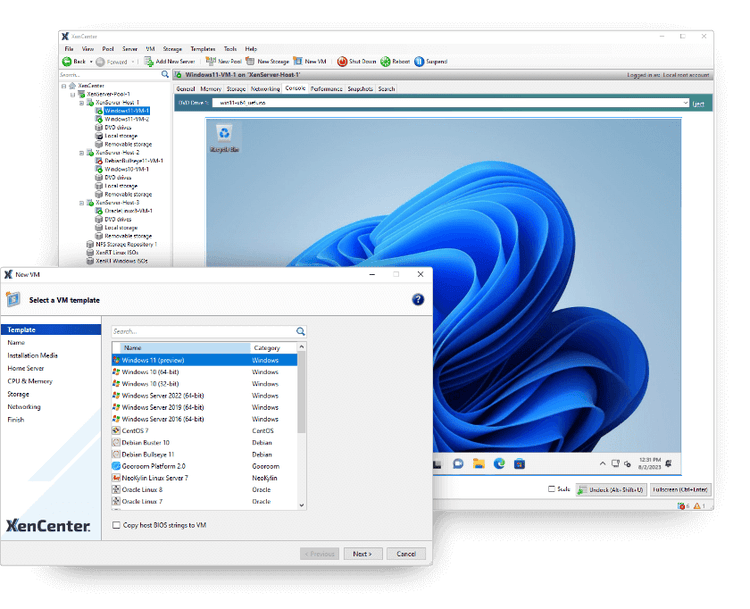
Get full access to the XenServer 9 enterprise feature set for up to 90 days on a 3-host pool. Test real workloads and validate operational fit in your own environment.
To get started, just download the XenServer 9 Installation ISO. Once installed, you'll automatically be running the trial. While using this Trial edition, you won't have access to official support. Your assistance in enhancing the product is valuable, so please report any bugs and share your feedback with us.
All editions of XenServer include the capability to run Windows 11 VMs.